


Digital invitations
A beautiful, shareable invitation page for weddings and 80+ other occasions.
- 12 ways it opens — envelope, temple doors, aurora…
- 60+ templates in Indian languages and traditions
- Countdown, photo gallery, venue map and guestbook

Free plan · No credit card · Live in 5 minutes
eInvit turns your event details into a beautiful digital invitation page, sends it to every guest by WhatsApp or email, and lets you share it across social media. Behind the page sits a complete guest management platform and an advanced dashboard — live RSVPs, planning and event copilots, budgeting, seating and hotel rooms, a QR check-in desk, UPI gift money and print-ready reports — so you can invite, organise and run the whole day from one place. Made in India, for weddings, birthdays, corporate events and 80+ other occasions.
A beautiful, shareable invitation page for weddings and 80+ other occasions.
Reach every guest on WhatsApp or email, share on social media, and watch the responses arrive live.
Check-in, seating and hotel rooms — handled on the day.
Always know the next step, and get print-ready reports.
A full public event page when you do not need RSVPs.
230 printable card designs in Card Studio.
No design skills, no app for your guests — just your event details and a few taps.
Free plan · No credit card · Live in 5 minutes
One beautiful page, from first glance to final thank-you. No app, no download, no per-message fees.
eInvit builds a free, shareable webpage for almost any occasion — not just weddings. Pick one below, or browse 80+ event types once you're in.
Wedding
RSVP tracking, countdown, gallery, guestbook and invites by WhatsApp or email — everything your guests need in one link.
Create Free Wedding Webpage →Birthday
From a milestone bash to a simple family get-together — countdown, gallery and RSVP tracking, shared by WhatsApp, email or social media in minutes.
Create Free Birthday Webpage →Engagement
Announce the big news with a beautiful page — your story so far, photos, and an easy way for guests to RSVP.
Create Free Engagement Webpage →Wedding Anniversary
Mark another year together with a dedicated anniversary page — your story, photos, and an easy way for family to RSVP.
Create Free Wedding Anniversary Webpage →Housewarming
Announce your new home in style — address, date and directions on one page guests can RSVP to in a tap.
Create Free Housewarming Webpage →Graduation
Celebrate the achievement with a shareable page — photos, schedule and RSVP tracking for family and friends.
Create Free Graduation Webpage →Corporate Event
Product launches, conferences, annual days and award ceremonies — organiser branding, guest RSVP and analytics built in.
Create Free Corporate Event Webpage →Events
Baby shower, reunion, memorial or something all your own — describe it and get a shareable event page.
Create Free Events Webpage →Plus baby showers, reunions, memorials, seminars and more — see all 80+ event types →
80+ event types for every community, in India and around the world — weddings, baptisms, nikah, sangeet, corporate events, seminar, expo, townhall and more
Every countdown, RSVP button and sharing flow below is live — the same engine that tracks real guests for thousands of real weddings. This is what your guests will see, and what you'll manage behind the scenes.
Gift-money UPI QR, live countdown, WhatsApp & email invites and more
💌 Royal Seal style — a keepsake envelope, sealed in wax
No login needed · Works on all devices
A template picks your colours. A Style picks the experience — how the invitation opens, moves and feels when a guest taps your link. Choose one in a tap, change it any time, on every plan.
An envelope flap lifts, a 3D card rises out of it and the wax seal cracks open. The card tilts with your finger or mouse.
Best for: Weddings, engagements, anniversaries — anything classic and heartfelt.
See it on a real event:
Carved double doors with glowing lamps part to reveal the invitation on a rich, lit backdrop with a gold arch frame.
Best for: Traditional ceremonies, festivals, housewarmings, religious rites and community functions.
See it on a real event:
A hand-drawn vine grows around the page, blossoms open one by one and petals drift down while the names write themselves in.
Best for: Garden weddings, baby showers, birthdays, naming and thanksgiving celebrations.
See it on a real event:
A ring of light draws itself around a monogram, then flows into a frosted-glass card floating over a slow-moving aurora.
Best for: Modern weddings, corporate events, launches, galas, graduations and parties.
See it on a real event:
A fine double-rule frame draws itself around a sheet of ivory stock, then the names rise into place like freshly pressed type above a quiet, editorial date line.
Best for: Intimate weddings, engagements, christenings, milestone birthdays and anyone who prefers restraint to spectacle.
See it on a real event:
Mist lifts off a quiet pond as a single lotus opens petal by petal, ripples spread, lily pads drift and two small lamps float by. The names settle on a petal-cornered card, with the date resting like a drop on the water.
Best for: Hindu and Buddhist ceremonies, Vidyarambham, naming ceremonies, pujas, thread ceremonies and festive family functions that want calm and light rather than ornament.
See it on a real event:
A spotlight comes up on a dark stage, velvet curtains draw apart, and a frame of chasing bulbs lights the card. The names appear in gold, and the date is a punched admit-one ticket.
Best for: Receptions, cocktail evenings, golden anniversaries, award nights, premieres, galas and glamorous destination weddings.
See it on a real event:
A twilight sky warms toward the horizon as the sun rises out of the water, waves roll in slowly, and an arched card with your details settles into the glow.
Best for: Beach and destination weddings, sangeet and haldi evenings, engagements, housewarmings and new beginnings of every kind.
See it on a real event:
A parchment scroll unrolls from its gilded rod, line by line, as the names are inked in calligraphy and a wax seal is pressed at the foot.
Best for: Weddings, engagements, anniversaries and milestone birthdays that call for old-world grandeur and a timeless, formal tone.
See it on a real event:
A diamond lattice settles on champagne paper, then a stepped crest and a gold sunburst fan draw themselves line by line. A pilastered panel unfolds below with the names in deep ink and a ruled date.
Best for: Daytime and garden-party weddings with a 1920s accent, city weddings, anniversaries, hotel galas, award lunches and corporate dinners.
See it on a real event:
Concentric rings draw themselves and lotus petals open outward in a slowly turning mandala, then a cream arch-shaped card rises from its heart.
Best for: Ceremonies of faith and passage — Hindu and Buddhist weddings, naming, Vidyarambham, Upanayanam, housewarmings, pujas and festivals.
See it on a real event:
Pools of watercolor bloom across textured paper, a brush stroke sweeps under the names as they are written in script, and tiny confetti dots drift by.
Best for: Baby showers, baptisms, naming ceremonies, first communions, birthdays, engagements and relaxed, joyful gatherings.
See it on a real event:
Two washi-paper shoji screens slide apart to reveal a calm ivory room. Cherry blossom petals drift down, a single ink-brush circle (enso) draws itself, and the names settle in vertical-rhythm serif above a red hanko stamp that presses the date.
Best for: Weddings with a minimalist or zen mood, Buddhist ceremonies, engagements, tea-garden and destination events, baby celebrations and anyone who loves Japanese calm.
See it on a real event:
An eight-pointed girih star and interlaced lines draw themselves over glazed zellige tiles, a horseshoe-arch doorway opens at the centre, and the invitation appears inside the arch with the names in gold calligraphic serif and the date set in a small tile cartouche.
Best for: Nikah and Walima, Eid and Ramadan gatherings, Arabic and Moroccan-themed weddings, engagements, Mehndi nights and any event that loves Islamic geometry.
See it on a real event:
Rows of colourful cut-paper banners (papel picado) unfurl across the top and sway gently, confetti drops, and a bright card with a scalloped edge bounces in with the names in a playful display face and the date on a paper flag.
Best for: Birthdays, quinceañeras, first communions, baby showers, sangeet and mehndi nights, housewarmings, festivals and any loud, joyful celebration.
See it on a real event:
Warp threads drop down the screen and weft shuttles weave across them until the cloth is complete; a diamond lattice drifts, gold glints float up, and a dark-glass card rises inside a border whose light travels around it. The names are liquid gold foil — every letter flips up in turn and a shine runs along them — above a date medallion with a rotating ring and an orbiting diamond.
Best for: West African and African-diaspora weddings, cultural nights, graduations, anniversaries, naming ceremonies and any celebration that wants rich colour, gold and drama.
See it on a real event:
Coloured blocks slide onto a visible grid, then the names stack in oversized grotesque type, flush left, with a thin rule that measures out the date, time and venue like a poster. No ornament, only layout.
Best for: Modern weddings, corporate events and launches, conferences, award nights, graduations, exhibitions, gallery openings and design-minded hosts.
See it on a real event:
The screen snaps on. A striped neon sun rises over a perspective grid that rolls towards you while stars twinkle and neon shapes drift. A glass panel with a travelling neon border holds the invitation: the names flicker on like neon tubes and glitch with an RGB split, an equalizer dances, and the date is a SCORE panel that counts up between two spinning coins.
Best for: Birthdays, college and corporate parties, housewarmings, bachelor and bachelorette nights, anniversaries with a retro-future mood and anyone who loves games, music and neon.
See it on a real event:
Where to choose it: Step 4 when you create an event, or any time in Design/Style in your event editor. Guests never need to install anything — and your link never changes.
Create Your Free Invitation →From the moment you create an invitation to the last memory shared after the big day — here's everything eInvit handles for you, on both sides of the link.
Add your details, pick a template for your religion & ceremony, and your page is ready — no design skills needed.
Send it by WhatsApp or email — one guest at a time or your whole list in bulk — or share it on social media. Every guest gets their own personalised link.
Guests view the invite on any device — countdown, gallery, map — and reply with meal choice & plus-ones in seconds.
Every reply appears the moment it is sent, in one live Guest Management dashboard — who’s coming, how many people to plan for, and who hasn’t answered yet. No spreadsheets.
Reminders and live day-of updates go out on their own, keeping every guest informed right up to the big day.
QR check-in tracks arrivals as they happen, and the gallery keeps every photo and message long after the event.
Real screens from the admin dashboard — guest management, live analytics, budgeting and card design, all in one place.
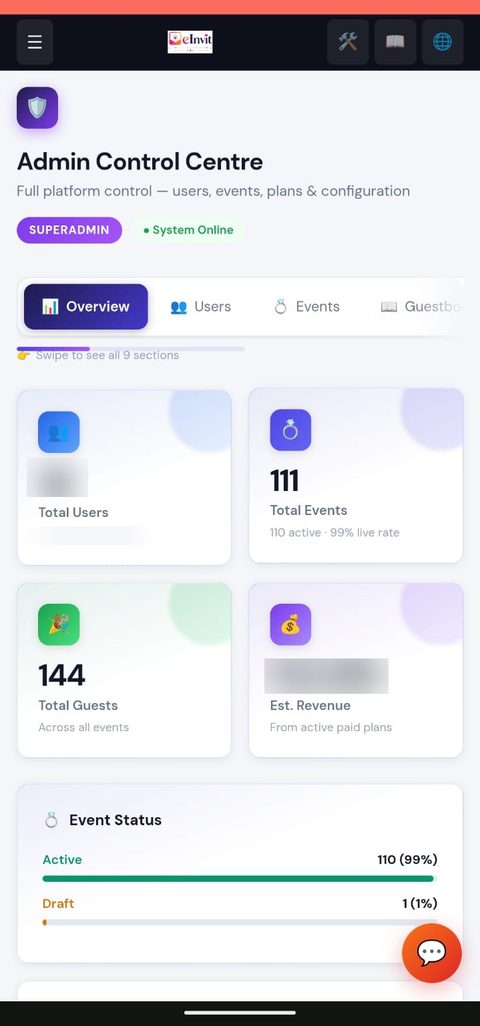
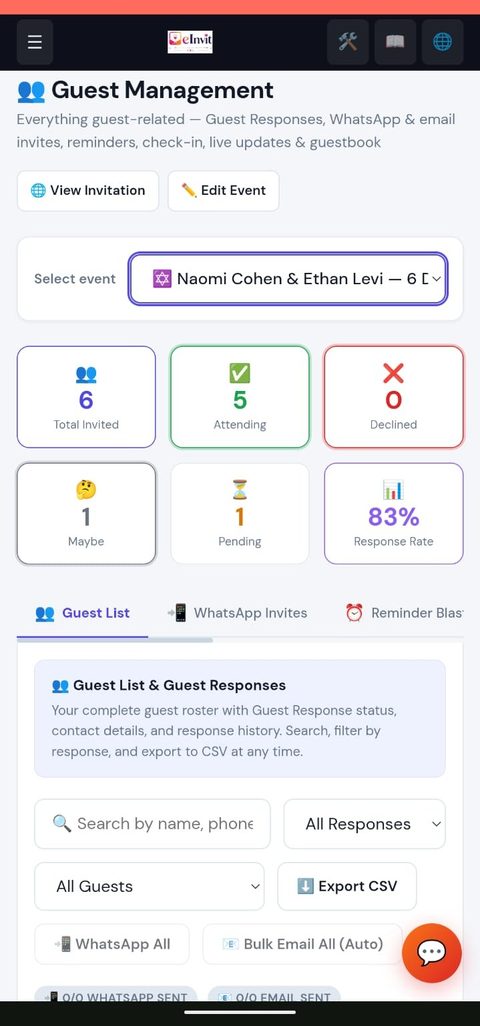
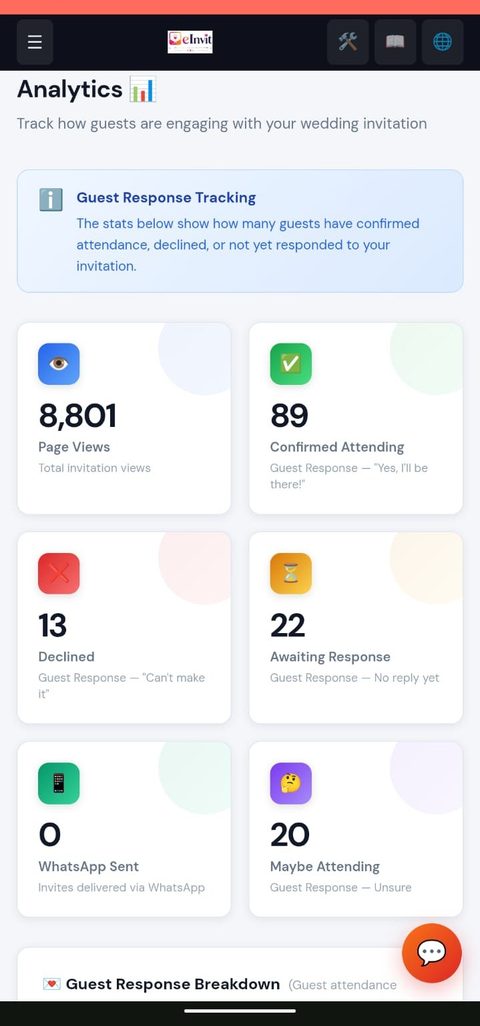
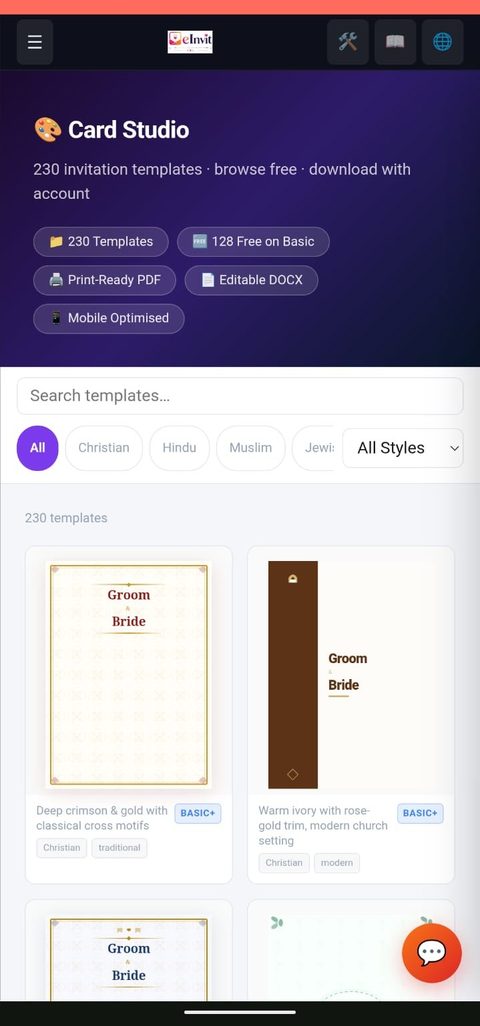
Planning, entrance, seating, hotel rooms, print-ready reports and full event websites — pick a tool to see how it works.
Nine powerful tools that plan your event, run your entrance, seat your tables, house your guests and gather your gifts — all driven by one guest list.
Planning Copilot
Budget split, dated checklist and plates, rooms & vehicles sized from real RSVPs.
Event Copilot
Next best step, readiness score and a headcount forecast.
Check-in Desk
Per-event check-in, QR passes and offline volunteer links.
Eventwise Guest Invitation
Each guest sees only the events they are invited to.
Per Event RSVP
A separate Yes or No for every function.
Seating Charts
Round, rectangle & square tables with live capacity checks.
Hotel Room Management
Room blocks, rates, cutoffs and room-by-room assignment.
UPI Gift Money
Scannable UPI QR — zero commission.
Gift Registry
Registry link plus a built-in wish list.
Two powerful new tools for hosts managing large guest lists — professional seating charts and hotel room block management. Both included free with our new Event Pro plan, built for large weddings and corporate events.
✦ Both included free with our new Event Pro plan — see pricing below.
A real check-in desk for the entrance — and the power to invite each guest to exactly the events they belong at. No separate app, no helper logins, no paper list.
Volunteer desk links
Private, revocable, expiring links per gate — ushers check guests in from their own phones. No login, no sharing yours.
Works offline
Venue signal drops? Check-ins queue on the phone and sync once, with no double check-ins, when it returns.
Guest entry pass
Each guest's personal link shows a QR pass with table and seat. Volunteers scan it — or type the code.
Safe by design
Helper links are stored only as a hash and can be revoked instantly. Two desks scanning one guest? First one wins.
✦ Check-in Desk & Eventwise Guest Invitation — on selected plans
Search, walk-ins, undo, party counts and live arrived-versus-expected numbers stay free on every plan — nothing you already use is taken away. Event Pro adds seating charts and hotel blocks on top.
Six print-ready PDF reports built from your own event data — how many to cook for, who to chase, what you have spent and who actually came. One tap, saved as a PDF, private to you.
Follow-up list
Everyone who has not replied or said maybe, ranked by who to chase first — VIPs and guests who opened but stayed silent — with phone, email and a suggested nudge.
Catering & dietary brief
One page for the caterer: the number to cook for, confirmed versus tentative, and dietary needs counted from your guests' notes.
Day-of run sheet
Programme timings, tasks with tick boxes (overdue ones flagged) and every vendor's phone number — printed for the family member running the day.
Attendance report
After the event: show-up rate, who said yes but did not come, walk-ins, and your busiest hour at the door. Useful for planning the next one.
✦ Guest Management → Reports → Download PDF → Save as PDF
Reports are included on every plan, private to you and built in your browser from your own data — no external AI service, nothing shown to guests. The budget statement and run sheet use the Budget tracker and Day-of Coordination Hub, so they follow those features on your plan.
One toggle turns off the invitation page and the RSVP form entirely — guests land straight on a complete public event website. Works for any event type, on every plan, no upgrade needed.
✦ Included free on every plan, including Free
Weddings, corporate events, birthdays, graduations, housewarmings — any event type at all. No add-on, no upgrade.
A complete platform for weddings, corporate events & every celebration in between — trusted by couples, wedding planners and businesses across India and around the world, from creation to Guest Response tracking
Host Reports, Check-in Desk, Eventwise Guest Invitation, Event Copilot & Invitation Styles
Planning Copilot — a Planner Built for Your Event
Open it from your dashboard and get a budget split with a verdict for your city, a dated week-by-week checklist, who to book and when, and plates, rooms and vehicles sized from your real RSVPs — with local tips for 75+ city and destination-wedding profiles across every Indian state and union territory, including all 14 Kerala districts. It is rule-based, so it never invents prices or vendors, and your ticked steps are saved per event. Available on selected plans.
Check-in Desk — Run the Entrance Like a Pro
Check guests in per event — ceremony, reception, lunch — with warnings for the wrong event, a guest who declined or a room over capacity, plus QR entry passes, an arrival timeline and a CSV attendance sheet. Search, walk-ins, undo, party counts (3 of the 4 invited arrived) and live arrived-versus-expected numbers stay free on every plan. Desk upgrade from Ultimate.
Volunteer Desk Links — Helpers Need No Login
Give each gate its own private, revocable, expiring link (stored hashed, optionally locked to one event). Ushers check guests in from their own phones — camera QR scan or typed code — and it keeps working offline: check-ins queue on the phone and sync once, with no double check-ins, when the signal returns.
Eventwise Guest Invitation
You decide which guests are invited to which events — reception only, or ceremony plus lunch. Set it per guest, in bulk, or with an events column in your CSV. Each guest sees, adds to calendar and responds to only their own events; mark an event Private and set a capacity, and the planner warns you before it overflows.
Event Copilot — Know What To Do Next
Your dashboard tells you the next best step for every event: publish, invite, nudge the guests who opened but didn't reply, lock the final headcount. A readiness score, a realistic headcount forecast, and a Smart Reminder Writer that drafts personalised WhatsApp messages in English, Malayalam or Hindi — all on your own data, no AI service.
Host Reports — Print-Ready PDFs in One Tap
Six reports built from your own event data: an RSVP and headcount forecast with a number to plan for, a ranked list of guests to chase, a one-page catering and dietary brief, a budget and payments statement, a day-of run sheet and a post-event attendance report. Private to you — no AI service, nothing shared with guests.
18 Invitation Styles — Choose How It Opens
Pick the experience, not just the colours: Royal Seal envelope, Heritage Gate temple doors, Botanical Bloom garden, Midnight Aurora glass, Ivory Atelier letterpress, Lotus Pond blooms, Gilded Marquee theatre, Golden Hour sunrise, Imperial Scroll, Art Deco Gala, Sacred Mandala, Watercolor Wash, Sakura Shoji, Zellige Arabesque, Papel Picado Fiesta, Kente Weave, Swiss Grid or Pixel Arcade. Every style works with every template, on every plan, and you can switch any time in Design/Style.
Event Website Mode — No Invitation, No RSVP
Turn any event into a full public website instead — schedule, photos, venue map, FAQ and guestbook, with no invitation page and no RSVP form to fill out. One toggle at creation or anytime after in Settings.
Story Page, Leveled Up
Every Story Page now also gets a live countdown timer, an embedded venue map, a guestbook for well-wishes, and an FAQ accordion — whether you're running an invitation or a full Event Website. Event Websites also get an auto-generated "Words for the Occasion" quote section and a Congratulations card with your own name built right in — no extra writing needed.
60+ Religion-Aware Templates
Christian, Hindu, Muslim, Jewish, Buddhist, Sikh, Interfaith, North & South Indian, Corporate — including a bold new Material Design collection alongside the classic floral & traditional catalogue.
4-Step Creation Wizard
Go from blank page to a published invitation in minutes with a guided setup flow.
Drag-and-Drop Editor
Reorder content blocks and photos, tweak colours and fonts — no code required.
Event-Aware AI Story Writer
On-device AI writer adapts to your occasion — a couple narrative for weddings & nikah, an "about" story for baptisms, graduations & corporate events, a home story for housewarmings, or a respectful memorial story. Three drafts, one click to edit.
AI-Suggested Welcome Messages
Get three ready-to-use invitation message drafts in your event's tone with one tap — instant and free, generated entirely from a curated phrase bank, so nothing is ever invented about your event.
80+ Event Types Across All Communities
Christian, Hindu, Muslim, Jewish, Buddhist, Sikh, Interfaith, North Indian, South Indian, Corporate and Universal event types — from Sangeet and Haldi to Confirmation, Chuppah, Anand Karaj and Corporate Townhalls.
Local Indian Language Support
Proper script for names and captions in your local Indian language, rendered beautifully on every device.
Regional Language Detection
Name fields in admin auto-adapt to the user's locale — the local Indian language of each state (Tamil, Telugu, Kannada, Hindi and more), English-only for international users. Zero configuration needed.
Card Maker Studio — 230 Print Cards
Browse 230 DOCX invitation card templates (Christian, Hindu, Muslim, Jewish, Buddhist, Sikh, Corporate, Royal, Floral & more). Free to preview, no login needed. Download as a print-ready Word file — a free account gets the basic templates, paid plans unlock more.
QR Code for Invitations
Auto-generated QR linking to your invitation — downloadable as a branded PNG. Print it on physical cards, banners or table cards.
Plan-at-Signup — One-Screen Registration
See all plans and pricing before you register. Pick your plan, apply a coupon, and pay — all on a single screen with a side-by-side feature comparison. No blind sign-up.
Custom Domain
Ultimate and Event Pro hosts can host their invitation on their very own domain name.
Discount Coupons
Apply promo codes like PLAN20 for a percentage off, verified securely server-side.
What your guests see and use
Event Story Page
Every invitation now includes a vibrant, photo-rich Event Story page — photos, full schedule, venue details and your story, all in one beautiful page. Guests are taken there automatically after responding.
Wedding Day Timeline
A detailed hour-by-hour schedule right on your invitation page — grouped into "Wedding Ceremony", "Reception" and "After Party" for weddings, or a simple flowing list for any other event. Guests always know exactly where to be and when.
Wedding Party / Entourage
Introduce your entourage in style — parents of the couple, best man, maid of honor, bridesmaids and groomsmen (shown paired), flower girls and ring bearers — as a dedicated section on your Story Page. Shown automatically for weddings.
Video Invitation
Record or upload a personal 10-second video message from you to your guests — it plays right on the invitation page, above the fold. No editing software needed, and it's included from the Starter plan upwards.
Livestream Your Ceremony
Add a YouTube, Facebook, Zoom or custom stream link — guests who can't travel watch live, right from your invitation page. YouTube plays inline; other platforms get a one-tap join button.
One-Tap Guest Response
Guests respond yes, no or maybe with meal choice and a message — no login needed.
Per Event RSVP — Guests Choose Their Events
Every guest is invited to all the events and decides which ones to attend, with a separate Yes / No for each — perfect for a multi-day celebration where someone attends the reception but not the ceremony. Add a special time (muhurtham, nikah time and more) to any event.
Live Countdown Timer
Animated countdown with days, hours, minutes and seconds until the big day.
Photo Gallery
Drag-and-drop gallery with a masonry layout and a full-screen lightbox viewer.
Venue Maps
Embedded Google Maps so guests get turn-by-turn directions instantly.
Multi-Event Timeline
List every function — sangeet, ceremony, reception — with its own time & venue.
Save the Date Mini-Page
A single-screen beauty at /save — countdown, couple names, date & venue, plus one-tap ICS calendar download for Google, Apple, Outlook & Samsung Calendar.
Add to Calendar & Auto Reminders
One tap adds every function to a guest's Google, Apple or Outlook calendar with the right venue and time. Guests who've responded also get an automatic email reminder 7 days and 1 day before.
Digital Gift Registry & Wish List
Add any external registry URL (Amazon, Honeyfund, YourStory.in) as a CTA card — or list specific items (name, note, product link) as elegant gift cards directly. No external registry needed.
UPI Gift Money QR
Let guests send a gift straight to your own bank account — scan and pay via any UPI app. eInvit never touches the money: no gateway, no commission, no fees.
Live Day-of Updates
Post a short live message from the admin (up to 280 chars) — shown as a pulsing LIVE UPDATE banner on the story page. Perfect for "Ceremony starting in 10 mins".
"How We Met" Timeline
Add date-stamped milestones (first date, proposal, wedding) with emoji, title & description — rendered as a beautiful alternating left-right scrolling timeline.
Your Personal Entry Pass
Guests who open their personal invitation link get a QR entry pass with a text code, their table and seat, and only the events they are invited to — so the queue at the entrance becomes a quick scan. Appears automatically when the event uses the Check-in Desk.
Digital Guestbook
Guests leave heartfelt wishes with emoji reactions, moderated by you.
Mobile-First Design
Every invitation looks beautiful on the phone screen it will mostly be opened on.
Background Music
Set the mood with a song from our curated, free music library.
Background Reel / Video
Paste a Cloudinary MP4 URL to add a cinematic autoplay-muted video loop behind the story page hero section. Available on Premium Plus, Ultimate and Event Pro plans (or with the Gallery video uploads add-on).
AI Highlight Reel — Coming Soon
Turn your approved gallery photos into an auto-generated highlight video in one click. Planned for a future release — not included in any plan yet.
Vendor Credits Section
Showcase your photographer, caterer, decorator & more on the story page with Instagram handles and website links. Organic SEO + referral traffic for vendors.
Rich Social Previews
Custom Open Graph images make WhatsApp & Facebook link previews look polished.
Add to Home Screen — Personalised
Guests can add your invitation straight to their phone's home screen — with your names and your own photo as the icon, launching full-screen like an app. No install, no app store, just one tap.
Guests / Responses Hub
All guest communications in one dedicated page — Guest Response dashboard, Check-In, Reminder Blast, Live Update, and Personalised Invites — each in a clean sub-tab with a live Guest Response snapshot always visible.
Day-Of Coordination Hub
A private task checklist and vendor black-book built right into your event editor — track what's booked, what's pending, and who to call, all in one place before the big day.
Vendor Marketplace
Browse photographers, caterers, decorators, makeup artists and more, and request quotes directly from your event editor — no more hunting through WhatsApp groups for recommendations.
Budgeting & Expense Tracker
Set a target budget, break it into categories like Venue and Catering, and log expenses with partial-payment tracking — private to you, never shown to guests.
Personalised WhatsApp Invites
Write one message template with {name} and {invite_url} — each guest gets a unique WA link with their name pre-filled. No paid Meta API needed — no per-message charges.
WhatsApp Reminder Blast
Auto-loads all guests who have a phone, received an invite, but haven't responded — generates pre-written reminder links per guest in one click.
Guest Arrival Check-In
Mobile-first check-in page for hosts at the entrance — search guests, mark arrived, add walk-ins, live stats with animated progress bar. Also available as a tab in Guest Management, where Ultimate and above unlock the Check-in Desk upgrade — per-event check-in, volunteer links, entry passes and an attendance export.
Live Analytics Dashboard
Track page views, Guest Response trends and guest engagement per event in real time.
Guest CSV Import
Upload an existing guest list in one go instead of typing names one by one.
HTML Invitation Export
Download your wedding page and love story page as fully self-contained HTML files — complete with eInvit branding, watermark, and footer CTA. Perfect for offline sharing or archiving.
Unified Plan & Page Expiry
One single expiry date for both your plan and your invitation page — no more two confusing different dates. When the plan expires, the page expires. Same day, every time.
Revenue & Transactions
See every payment, plan upgrade and coupon redemption in a single ledger.
DB-Driven Plan Config
Pricing, limits and feature flags live in the database — no code deploy needed.
Your invitation lives online — guests open it instantly on their phone. Guest Response tracking, countdown, gallery, guestbook & venue map all included. Free to start. No app download.
Want a printable paper card alongside your digital invite? Browse 230 DOCX templates — Christian, Hindu, Muslim, Jewish, Buddhist, Sikh, Corporate, Royal, Floral, Graphic Modern & more. Free to preview, no login needed. A free account downloads the basic templates; paid plans unlock more. ⚠️ This creates a static physical card file, not a shareable digital invitation page.
Stunning templates for every celebration across India — Christian, Hindu, Muslim, Jewish, Buddhist, Sikh, North Indian, South Indian, Corporate & modern couples, plus a bold new Material Design collection.
The smarter choice for modern Indian couples
⭐ Rated by real couples — see (or share) your own experience:
Start free. Upgrade only if you need more. No hidden fees.
Traditional printed invitations are expensive. See how much eInvit saves you for an Indian wedding with 175 guests.
Guest Count
eInvit is a 100% online platform — couples create and share their digital wedding invitation from anywhere in the world. Proudly used by couples in every Indian state, with deep roots in Kerala, and by the Indian diaspora across the globe.
Searching for an online wedding invitation maker near me, a digital shaadi card for your Indian wedding, or a wedding invitation website in your local Indian language? eInvit serves couples across every Indian state and union territory — from Mumbai, Bangalore, Delhi NCR, Chennai, Hyderabad, Pune, Kolkata and Ahmedabad to every district of Kerala — Ernakulam, Kottayam, Thiruvananthapuram, Kozhikode, Thrissur, Alappuzha, Palakkad, Malappuram, Kannur, Kollam, Pathanamthitta, Idukki, Wayanad and Kasaragod — plus Indian and Malayali diaspora couples planning weddings from the Gulf, USA, UK, Canada, Australia and Singapore. Tony Augustine Labs is headquartered in Kerala, India, and is a Udyam/MSME-registered (Govt. of India) software enterprise.
No question matches that. Try another word, or ask us directly.
No credit card. Free plan available. Live in 5 minutes.
No credit card · Cancel anytime · Proudly made in India 🇮🇳
Already have an eInvit account? Sign in →
Practical, no-signup-required guides for every tradition and every stage of planning — from budgeting to invitation wording.
Every tab, every feature, every day-of tool — from account setup to guest check-in, explained step by step.
A 12-month timeline covering budget, guest list, venue, and vendors.
Read guide → EngagementRing exchange traditions, guest list sizing, and venue ideas.
Read guide → NikkahNikkah vs Walima, ceremony essentials, mahr, and invitation etiquette.
Read guide → Christian & KeralaChurch ceremony structure, Kerala customs, and reception planning.
Read guide → BudgetA realistic spending breakdown and where you can actually save.
Read guide → VenueVenue types compared and a full site-visit checklist.
Read guide → AttireWhen to start shopping, fabric choices, and fittings.
Read guide → RSVPWhat RSVP means, why replies go missing, and how a free RSVP page tracks them for you.
Read guide → InvitationsWording examples across traditions, plus Guest Response etiquette.
Read guide →No sign-up, no watermark, and everything stays on your device. For every tradition.
Shortlist muhurat or weekend dates by month, with sources shown.
Open free tool →Hour-by-hour schedules for Hindu, Christian, Muslim, Sikh and civil weddings.
Open free tool →Outfits, jewellery and a packing list for every ceremony.
Open free tool →Six looks, PDF, Word and WhatsApp image. No watermark.
Open free tool →
